The Imperfect Tool: Why AI Doesn't Need to Be Flawless to Be Useful

The tradeoff in plain sight: AI accelerates your output, but perfection was never part of the deal.
The Mistake That Started This Post
Last week I published a LinkedIn post promoting my deep research piece on big tech layoffs and security exploit escalation. The post got traction. The analysis was solid. The data was sourced and cited. The writing was tight.
The image had a problem.
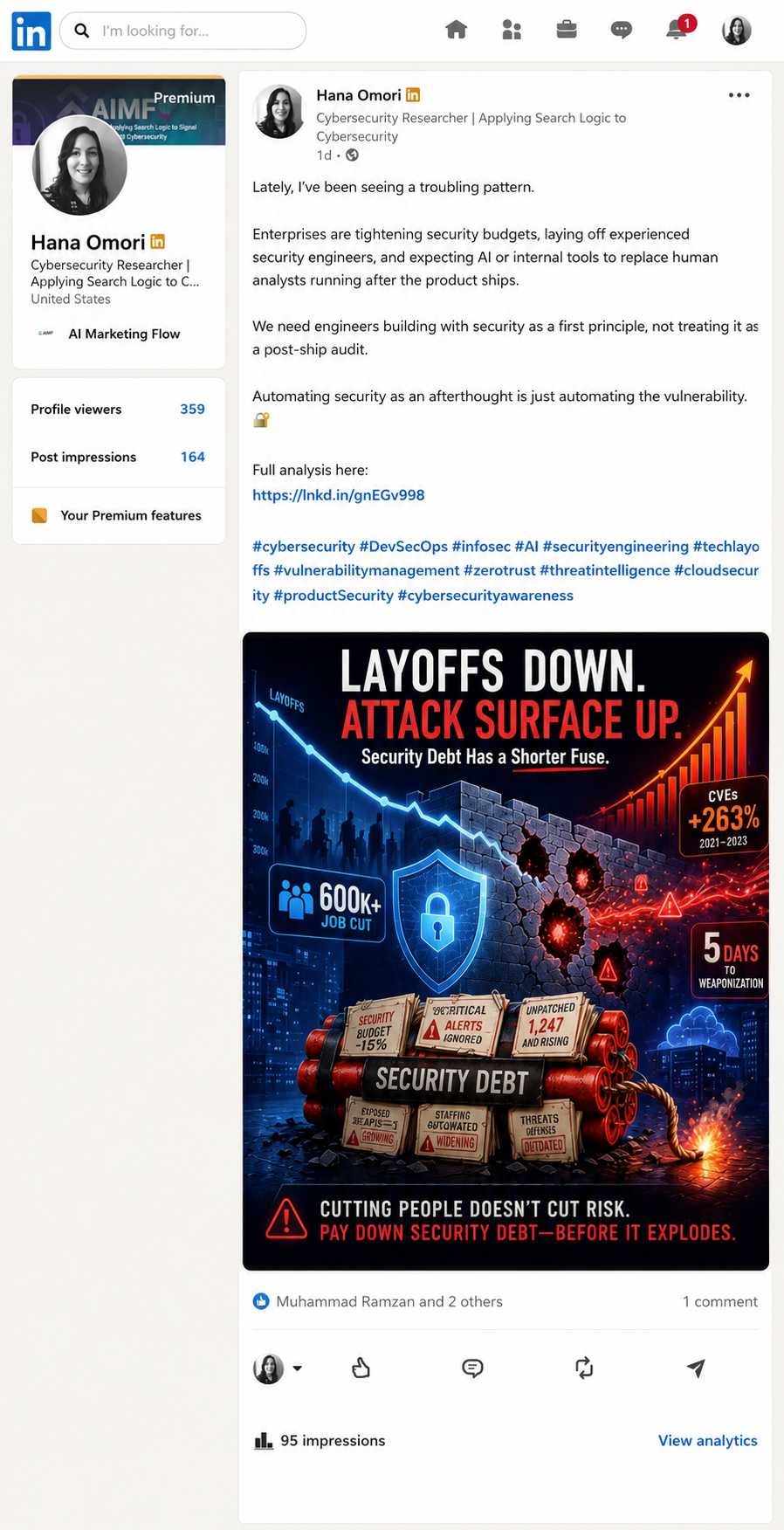
The post in question. The research was solid. The image had artifacts from asking AI to merge two visual concepts into one frame. I posted it anyway — deliberately.
I used AI to generate a promotional graphic that combined two separate concepts I wanted to highlight — the workforce contraction numbers and the CVE explosion data. When the model merged them into a single visual, some of the text came out illogical. Numbers next to labels that didn't quite match. Phrasing that made sense for each concept individually but read awkwardly when composited together.
I posted it anyway.
Not because I didn't notice. Not because I was lazy. Because I made a conscious decision that the value of rapidly articulating a complex idea and getting it in front of my network outweighed the cost of an imperfect image. The research was sound. The writing was mine. The image was a vehicle — and a slightly dented vehicle still gets you where you're going.
That tradeoff — accepting a known imperfection in exchange for speed, reach, and output volume — is the entire point of this post.
Defining Your AI Risk Threshold
Every time you use AI, you're implicitly accepting a risk threshold. Most people just don't think about it consciously. They should.
The Risk Threshold Framework
For any AI-assisted task, ask yourself:
- What's the cost of an error? — A LinkedIn image with awkward wording? Low. A security audit with hallucinated findings? Catastrophic.
- What's the cost of NOT using AI? — Three extra hours designing a graphic manually? That's three hours I could spend on actual research.
- Can I verify the output? — If I can review it and catch critical errors, the risk drops. If I'm blindly shipping AI output, the risk is unacceptable.
- What's the audience's tolerance? — A LinkedIn post? People scroll fast. A published CVE analysis? Every number has to be right.

Not every AI output needs to be perfect. Define your threshold consciously — then spend your human hours on what demands zero tolerance.
My risk threshold for that LinkedIn image was: the research quality carries the post, the image supports it visually, and minor text artifacts in a generated graphic are an acceptable tradeoff for a same-day publish. That's a deliberate, conscious decision — not carelessness.
Where the Threshold Should Be High
| Context | Risk Tolerance | Why |
|---|---|---|
| Security research data & analysis | Zero tolerance | Credibility depends on accuracy; errors undermine the entire argument |
| Code in production | Zero tolerance | Bugs ship to users; security vulnerabilities have real consequences |
| Client deliverables | Zero tolerance | Professional reputation; contractual obligations |
| Blog post writing & arguments | Low tolerance | Your name is on it; ideas need to be coherent and defensible |
| Social media promotional graphics | Moderate tolerance | Visual support for written content; consumed quickly; imperfections noticed by few |
| Internal notes & brainstorming | High tolerance | Speed matters more than polish; only you see it |
The problem with the current AI discourse is that people treat every use case as if it demands zero tolerance. That's paralyzing. It's also not how any other tool in history has been evaluated.
Imperfect Doesn't Mean Useless
There's a strange binary in how people talk about AI right now. Either it's going to replace everyone and everything, or it's unreliable garbage that can't be trusted. Both positions are wrong. The reality is more mundane and more useful:
AI is a powerful but imperfect tool that dramatically amplifies human capability when used with clear-eyed awareness of its limitations.
That's it. That's the whole thesis.
The Replacement Fallacy
The dominant narrative — "AI will replace X" — has created a toxic incentive structure. Companies are deploying AI to eliminate headcount rather than enhance capability. The result is predictable: AI operating without adequate human oversight produces errors at scale, and there are fewer humans left to catch them.
The 10x Speed Trap
Teams are being told to "develop at 10x speed with AI." Here's what actually happens:
- Week 1: Ship 10x faster. Leadership celebrates.
- Week 4: Bugs surface. Edge cases missed. Security holes found.
- Week 8: Team is spending more time fixing AI-generated code than they would have spent writing it correctly the first time.
- Week 12: Technical debt from AI-generated output now requires a dedicated cleanup sprint.
The "10x" was an illusion. You moved the work from "building" to "debugging and tuning" — and debugging someone else's logic (even if that someone is an AI) is often harder than writing your own.
The Recursion Problem: More Data Doesn't Fix Hallucinations
We've now seen enough evidence from recursive model training to state this clearly: adding more data and more compute does not reliably reduce hallucinations. In many documented cases, it makes them worse.
The fundamental issue is architectural. Large language models are next-token predictors. They don't "know" things — they predict statistically likely continuations. When you train them on more data (including AI-generated data feeding back into training sets), you're not teaching them to be more accurate. You're teaching them to be more confidently wrong in more sophisticated ways.
The answer isn't to throw more compute at the problem. It's to design workflows where humans and AI each do what they're best at.
What AI-Assisted Building Actually Looks Like
I want to be transparent about something, because the "I built this with AI in a weekend" narrative is doing real damage to how people understand software development.
I build applications with AI assistance. I've been open about that. What I haven't always been explicit about is that having a technically functioning product is not the same as having a product ready to ship. Not even close.
My Actual Development Process
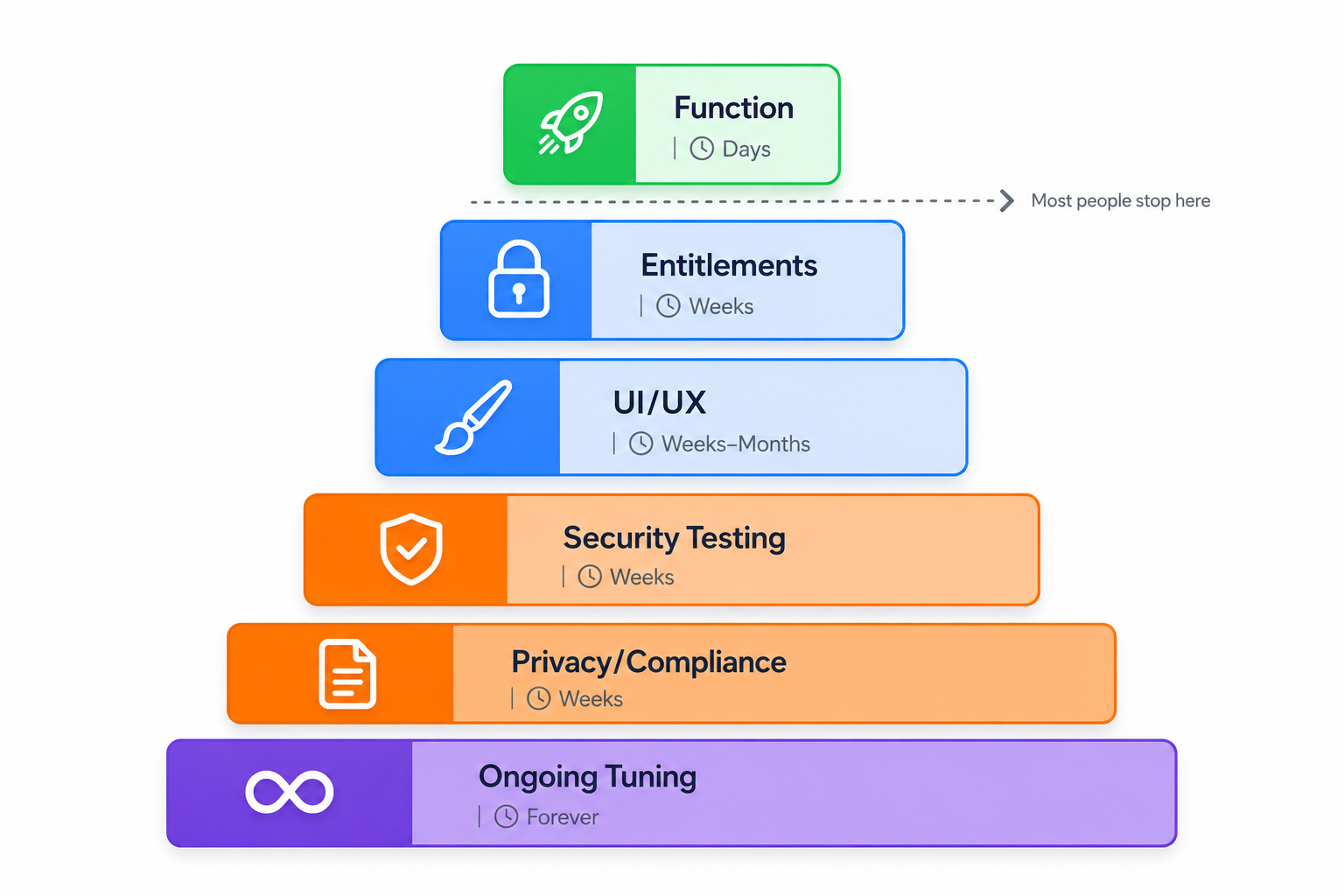
Having a functioning product is 15% of the work. The remaining 85% is what makes it ready to ship.
Here's what building an application actually looks like when you're doing it responsibly with AI:
Phase 1 — Core Function
Get the thing working. AI is genuinely useful here — scaffolding components, generating boilerplate, stubbing out API integrations. This is where the "I built it in a weekend" crowd stops and posts their demo video.
Time: Days to weeks. But this is maybe 15% of the actual work.
Phase 2 — Entitlements & Access Control
Who can access what? Role-based permissions. API key management. Session handling. Token rotation. This is where AI starts generating plausible-looking but subtly wrong authorization logic that you have to audit line by line.
Time: Weeks.
Phase 3 — UI/UX Tuning
Making it not just functional but usable. Responsive layouts. Accessibility. Error states. Loading states. Edge cases in user flows. AI can generate a beautiful landing page, but it can't tell you that your form validation fails silently on mobile Safari.
Time: Weeks to months.
Phase 4 — Security Testing
Penetration testing. Input validation. OWASP Top 10 review. Dependency audits. Rate limiting. CORS policy review. This is non-negotiable, and AI is a tool in this process — not a replacement for it. You cannot ask an AI to pen test your app and trust the results without manual verification.
Time: Weeks.
Phase 5 — Privacy & Compliance
PII handling. Data retention policies. Privacy impact windows. Consent flows. Regulatory requirements depending on your users and jurisdiction. This is the stuff that gets you sued if you skip it.
Time: Weeks.
Phase 6 — Ongoing Tuning & Maintenance
Bug reports. Performance optimization. Dependency updates. Feature requests. User feedback integration. The product is never "done." This phase is indefinite.
Time: Ongoing. Forever.
Where AI Actually Helped — and Where It Didn't
| Phase | AI Contribution | Human Contribution |
|---|---|---|
| Core Function | High — scaffolding, boilerplate, rapid prototyping | Architecture decisions, integration logic |
| Entitlements | Medium — generated initial RBAC, needed heavy audit | Policy design, edge case identification, verification |
| UI/UX | Medium — generated components, missed accessibility and mobile edge cases | Design system coherence, cross-browser testing, user feedback |
| Security Testing | Low — useful for checklist generation, unreliable for actual testing | Manual pen testing, threat modeling, validation |
| Privacy/Compliance | Low — generated boilerplate policies, can't make legal judgments | Regulatory interpretation, risk assessment, decision-making |
| Ongoing Tuning | Medium — helpful for debugging, refactoring, test generation | Prioritization, user empathy, quality judgment |
AI helped me move faster. It did not eliminate the work. The total time invested was comparable to building without AI — but the nature of the work shifted. Less time writing boilerplate. More time reviewing, testing, and thinking critically about what the AI produced.
Stop Trying to Make AI Perfect
Here's what I see happening in the industry right now, and it worries me:
Companies are pouring billions into making AI models that "don't hallucinate." They're training on ever-larger datasets, building ever-more-complex RLHF pipelines, adding retrieval-augmented generation layers, implementing constitutional AI constraints — and the hallucination rate drops from 15% to 12% to 9% but never to zero. Meanwhile, the cost per inference goes up, the latency goes up, and the model becomes less flexible.
We're chasing asymptotic perfection at exponential cost.
The Diminishing Returns Curve
Getting AI from 60% accuracy to 90% accuracy was revolutionary. Getting it from 90% to 95% was expensive. Getting it from 95% to 99% may be economically irrational. Getting it to 100% may be physically impossible with current architectures.
Every percentage point of improvement past 95% costs orders of magnitude more compute, more data, more engineering time, and more money — while delivering diminishing marginal value to the end user.
What If We Just… Stopped?
What if instead of spending another $10 billion trying to make GPT-Next hallucinate 2% less, we spent that money on:
- Teaching people how to verify AI output — AI literacy as a core professional skill
- Building better human-in-the-loop workflows — AI drafts, human validates, human ships
- Developing AI-augmented tools that make humans faster at the tasks AI can't do — judgment, ethics, empathy, context
- Letting humans grow with AI as a genuine extension of the workforce, not a replacement for it
The framing matters. "AI replaces humans" leads to headcount cuts, skill atrophy, and blind trust in flawed output. "AI enhances humans" leads to upskilling, critical thinking, and a workforce that can do more — not fewer — things.
AI as an Extension of the Human Workforce
Here's what I actually want to see happen:
The Enhancement Model
Instead of: "AI does the work, humans monitor."
Try: "Humans do the work, AI removes the friction."
- Writer + AI: Human crafts the argument and narrative. AI helps research, formats, generates supporting visuals. Human reviews everything before publish.
- Developer + AI: Human designs the architecture and security model. AI generates boilerplate and tests. Human audits, integrates, and ships.
- Security Analyst + AI: Human defines the threat model and investigation priorities. AI surfaces anomalies and correlates logs. Human makes the judgment call.
- Student + AI: Human defines what they need to learn. AI generates targeted practice material. Human does the actual learning.
In every case, the human remains the decision-maker. AI handles the mechanical, repetitive, high-volume work that used to consume hours. The human takes the time freed up to do more of what only humans can do: think critically, exercise judgment, build relationships, and create things that matter.
What to Do With the Time AI Frees Up
This is the part nobody talks about. If AI saves you 3 hours a day, what do you actually do with those 3 hours?
The wrong answer: produce 3x more AI-generated output.
The right answer:
- Learn a new skill. AI frees you from grunt work — use that time to level up in areas AI can't touch.
- Go deeper on quality. Instead of shipping 3 blog posts with AI errors, ship 1 that's bulletproof.
- Build human relationships. Mentor someone. Collaborate on a hard problem. Have a conversation that doesn't involve a prompt.
- Think strategically. AI can execute tactics. Only humans can set direction.
- Rest. Burnout doesn't become less real just because AI made you more productive on paper.
Coming Full Circle: The Tradeoff I Made
Let me be concrete about the LinkedIn post that prompted this entire essay.
What I gained by using AI for the image:
- 2+ hours saved — not designing a custom infographic from scratch
- Same-day publish — research done, writing done, visual done, posted — all in one session
- Those 2 hours redirected — into writing the actual blog post analysis, which required zero AI for the data, the arguments, or the conclusions
What it cost me:
- An image with slightly illogical wording where two concepts were merged
- A potential credibility ding from anyone who reads the image text carefully (most don't)
Was it worth it?
Yes. The research behind that post — Big Tech Layoffs vs. Security Exploit Escalation (2021–2026) — is 18 minutes of sourced, cited analysis covering 600,000+ layoffs, 263% CVE growth, zero-day escalation trends, and the structural mechanisms connecting them. That's what carries the post. The image is a visual hook.
I made a conscious, deliberate decision about where my time was best spent. The research quality was non-negotiable. The image quality was negotiable. I spent my finite hours on the non-negotiable part.
Conclusion — Let Humans Be Humans
We are in the middle of the most significant tooling shift in the history of knowledge work. AI is real. It's powerful. It's imperfect. All three of those things are true simultaneously.
The path forward isn't to:
- Pretend AI is perfect and blindly trust its output
- Reject AI because it makes mistakes
- Replace humans with AI and hope for the best
- Pour infinite money into making models 0.5% more accurate
The path forward is to:
Accept. Adapt. Enhance.
- Accept that AI is imperfect and will remain imperfect for the foreseeable future.
- Define your risk threshold for every use case — consciously, not by default.
- Use AI to enhance human capability — not to replace human judgment.
- Invest the freed-up time in irreducibly human skills — critical thinking, creativity, relationships, strategy.
- Stop chasing perfection and start building workflows where imperfect AI + attentive humans = excellent output.
My LinkedIn image had a mistake in it. My research didn't. I know the difference, and I made the choice deliberately. That's what working with AI responsibly looks like.